Most threat detections start with an alert. A rule fires. A threshold is crossed. A signature matches. The security team responds.
This one started with a question: which apps are talking on that machine?
What followed was a thread worth pulling — and a reminder that the data to catch an attacker is often already there. You just have to ask the right questions of it.
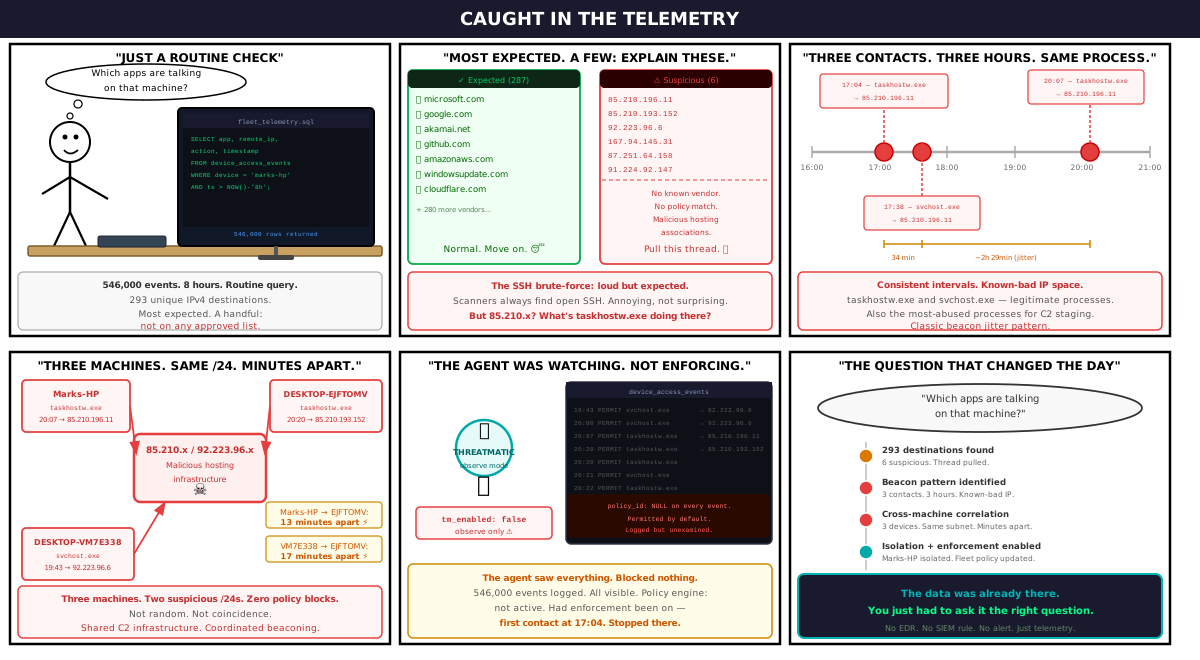
The Setup
Threatmatic's platform continuously collects network flow telemetry from enrolled endpoints. Every connection — application, direction, remote address, action taken, timestamp — is recorded and stored as a time-series event. No packet inspection. No deep-packet analysis. Just the facts of who talked to whom, through what process, and when.
On the morning of May 28, 2026, we queried the last 8 hours of telemetry across our active fleet. The goal was routine: understand what our endpoints were doing on the network.
We found 293 unique IPv4 destinations. Most were expected — Microsoft, Google, Akamai, GitHub, AWS. But a handful weren't.
The First Signal: SSH Brute-Force on Marks-HP
The clearest anomaly was also the least subtle. Marks-HP — a Windows endpoint — was running sshd.exe and receiving inbound connection attempts from known scanning and attack infrastructure:
| Source IP | Classification | Action |
|---|---|---|
167.94.145.31 | Censys scanner | BLOCK |
87.251.64.158 | Known attacker range | BLOCK |
91.224.92.147 | Known attacker range | BLOCK |
45.142.193.22 | Bulletproof hosting | BLOCK |
45.148.10.230 | Bulletproof hosting | BLOCK |
All blocked. But the underlying problem was clear: an SSH daemon exposed to the public internet is a target by definition. Every scanner on the internet eventually finds it. The blocks were working — but the exposure shouldn't have existed.
This was notable, but expected. Exposed SSH draws automated fire. What came next was different.
The Real Finding: Beaconing to 85.210.x
While the SSH noise was easy to explain, two other IPs in the suspicious set showed a pattern that is harder to dismiss as routine: 85.210.196.11 and 85.210.193.152 — different /24s within the same /16, both with associations to malicious hosting infrastructure.
Here is the full connection history for 85.210.196.11 from Marks-HP:
17:04:01  PERMIT  egress   taskhostw.exe
17:04:01  PERMIT  ingress  taskhostw.exe  port=59425
17:04:02  PERMIT  egress   taskhostw.exe
17:04:03  PERMIT  ingress  taskhostw.exe  port=59426
17:38:56  PERMIT  egress   svchost.exe
17:38:56  PERMIT  ingress  svchost.exe    port=64940
20:07:23  PERMIT  egress   taskhostw.exe
20:07:23  PERMIT  ingress  taskhostw.exe  port=52604
Three contact windows: 17:04, 17:38, and 20:07. The gap between the first and third is roughly three hours. The processes involved — taskhostw.exe and svchost.exe — are legitimate Windows system processes. They're also among the most commonly abused for process hollowing and in-memory C2 staging precisely because they blend into baseline telemetry.
The high ephemeral ports (59425, 59426, 64940, 52604) on the ingress side are consistent with reverse connection patterns: the infected host reaches out, the remote end responds on whatever port the OS assigned.
Then we looked at the sibling IP — 85.210.193.152 — and found it hitting a different machine in the same timeframe:
20:20:22  PERMIT  egress   taskhostw.exe  DESKTOP-EJFTOMV
20:20:23  PERMIT  ingress  taskhostw.exe  port=52695  DESKTOP-EJFTOMV
Marks-HP last touched 85.210.196.11 at 20:07. DESKTOP-EJFTOMV touched 85.210.193.152 at 20:20. Same /16. Same process. Thirteen minutes apart.
A Third Machine Joins the Picture
92.223.96.6 — a separate suspicious IP — appeared in the telemetry for both DESKTOP-VM7E338 and DESKTOP-EJFTOMV, contacted by svchost.exe 17 minutes apart:
19:43:33  PERMIT  svchost.exe  DESKTOP-VM7E338  → 92.223.96.6
20:00:45  PERMIT  svchost.exe  DESKTOP-EJFTOMV  → 92.223.96.6
Three machines. Two suspicious IP blocks. The same two system processes appearing across all of them. All permitted — because no policy existed to stop it.
What the Data Tells Us
To be precise: this is a strong indicator, not a confirmed compromise. taskhostw.exe and svchost.exe have legitimate reasons to make outbound connections. Windows Update, telemetry, license validation, and other system functions run through these processes.
What makes this pattern suspicious is the combination:
- Known-bad IP space.
85.210.xand92.223.96.6are not Microsoft, Google, or any expected vendor. - Regularity. Three contact windows in three hours, with consistent inter-arrival spacing, is a hallmark of beacon jitter.
- Cross-machine coordination. Different hosts contacting IPs within the same /16 within minutes of each other suggests either a shared infection or a shared C2 infrastructure assignment.
- No policy match.
policy_idwas null on every event. These connections were invisible to the policy engine — permitted by default, logged but unexamined.
The tm_enabled flag was false across the entire fleet for the beaconing traffic. That means the agent was in monitoring mode for those connections: observing and recording, but not enforcing. The SSH brute-force blocks were enforced by Threatmatic policy — those were working. But no equivalent egress policy existed for the 85.210.x and 92.223.96.x traffic. Had it been in place, the connections would have been stopped at first contact, at 17:04.
What Happened Next
Upon surfacing these findings, the recommended immediate actions were:
- Isolate
Marks-HPfrom lateral network access pending investigation - Block
85.210.0.0/16and92.223.96.0/24via Threatmatic policy across all enrolled devices - Pull process trees for
taskhostw.exeandsvchost.exeon affected hosts to determine parent process and loaded modules - Close the SSH exposure on
Marks-HP— move it behind a jump host or restrict ingress to known IPs via zone policy - Enable TM enforcement to shift from observe-only to active blocking
The Bigger Point
This detection required no EDR. No SIEM correlation rule. No threat intelligence subscription that happened to have these IPs on a blocklist. It required only one thing: asking the fleet what it was doing, and looking carefully at the answer.
The data was already there — 546,000 events in the device_access_events hypertable, continuously written by enrolled agents. The signal was in the telemetry. The question was whether anyone was reading it.
Threatmatic is built on the premise that most networks are already generating the evidence they need to catch an attacker. The missing piece is usually not more sensors. It's the ability to query what you already have — fast, at fleet scale, without writing a SIEM rule or waiting for an alert to fire.
The question which apps are talking on that machine? took seconds to answer. The answer changed the day.
Threatmatic is a Zero Trust Network Access platform with built-in fleet telemetry, policy enforcement, and device-level visibility. If you're running endpoints without enforcement — logging but not blocking — you may already have the evidence of a compromise sitting in your telemetry. We can help you find it.