Software updates are how vulnerabilities get patched, bugs get fixed, and capabilities get added. They are, in the aggregate, a positive force for security. Organizations that fall behind on patching face dramatically higher breach risk than those that update promptly.
But the update pipeline itself has become an attack surface — and even when updates are entirely legitimate, uncontrolled update behavior creates operational problems that security teams are increasingly struggling to manage.
The Supply Chain Attack Problem
The most serious risk in the update pipeline is not a vulnerability in the software being updated. It's a compromise of the update mechanism itself.
The SolarWinds attack — where a backdoor was inserted into a signed software update and distributed to approximately 18,000 organizations — demonstrated what supply chain compromise looks like at scale. The update was legitimate in every technical sense: it came from the correct vendor, it passed signature verification, it was delivered through the normal update channel. The malicious payload was already inside.
Kaseya, NotPetya, and numerous smaller incidents have followed the same pattern: a trusted update mechanism becomes the delivery channel for malicious code, precisely because trusted channels receive less scrutiny than suspicious ones.
The implication for organizations is uncomfortable: you cannot simply trust that a signed update from a known vendor is safe. You need visibility into what updates are doing after they deploy.
The Operational Problem: Synchronized Chaos
Supply chain attacks are the worst case. The everyday problem is more mundane but still significant: uncontrolled software updates cause operational disruption and create unpredictable network behavior.
Consider what happens when Windows Patch Tuesday arrives, and thousands of endpoints simultaneously begin downloading hundreds of megabytes of update packages. Network bandwidth is consumed. Application performance degrades. Business-critical traffic competes with update traffic on the same pipes. In bandwidth-constrained environments — remote sites connected via MPLS, branch offices on limited broadband, manufacturing floors with specialized networking — the impact can be severe.
The problem compounds when multiple vendors push updates simultaneously. Antivirus definition files, operating system patches, application updates, browser updates, firmware — each with its own update schedule, each unaware of the others, each competing for the same finite bandwidth.
Visibility First: Understanding Your Update Landscape
Threatmatic's approach begins with visibility. Before you can manage update behavior, you need to know what updates are happening, to which devices, at what volume, and on what schedule.
The same telemetry fabric that drives threat detection captures update traffic — allowing administrators to see, in real time, how much bandwidth update processes are consuming, which devices are running which software versions, and which endpoints are overdue for patches. This visibility is the foundation of informed update policy.
Staggered Rollout and Bandwidth Management
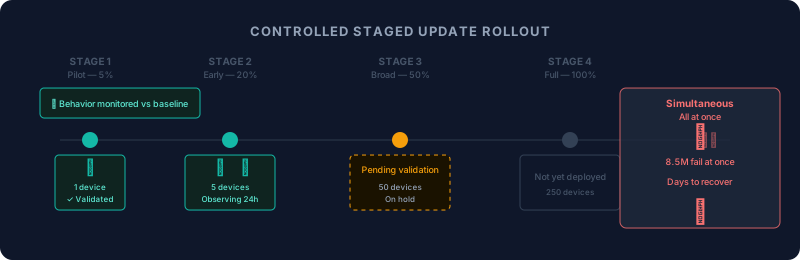
Once you have visibility, you can apply policy.
Threatmatic's traffic management capabilities allow administrators to:
Throttle update traffic by policy. Updates are important, but they are rarely more time-sensitive than the business traffic they compete with. Bandwidth policies can prioritize business-critical applications during business hours, allowing update traffic to consume available capacity during off-peak windows when it won't impact operations.
Stage updates by device group. Rather than allowing every endpoint to update simultaneously, policy-based staging rolls updates out to a test group first, then to progressively larger populations as the update is validated. If a faulty update causes problems — as in the CrowdStrike incident — it affects a small population rather than the entire enterprise.
Require network isolation for newly updated devices. A device that has just received a significant update is, briefly, an unknown quantity. Its behavior may have changed in ways that are not yet understood. Threatmatic's policy engine can place newly updated devices in a temporary observation state — allowing them to function normally while logging their behavior for comparison against pre-update baseline — before reinstating full network access.
Post-Update Behavioral Monitoring
The CrowdStrike outage was detectable — not in advance, but immediately. The behavioral signature of a mass simultaneous BSOD across thousands of endpoints is unmistakable in aggregate telemetry.
What is harder to detect is a supply chain compromise, where the malicious code is patient and subtle. Threatmatic's behavioral analytics establish a baseline for each device and continuously compare current behavior against that baseline. A newly updated endpoint that begins making unusual outbound connections, accessing files it never touched before, or communicating with infrastructure it has no business reason to reach — that is a signal worth acting on, even if the update itself appeared legitimate.
The update pipeline cannot be fully trusted. The behavior of updated devices can be monitored.
Patch Fast, Control the Rollout
The goal is not to slow down patching. Unpatched vulnerabilities are a real and persistent risk that must be addressed promptly. The goal is to patch in a controlled, observable, staggered manner — so that the update process itself does not become the operational failure or the attack vector.
Fast patching with behavioral monitoring and staged rollout is more secure than either fast patching without visibility or slow patching with complete control.
Learn how Threatmatic gives you visibility and control over software updates without slowing your patch cadence. Visit threatmatic.ai