Most security tools answer the questions you already know to ask.
Threatmatic MCP answers the ones you haven't thought of yet.
By connecting the Model Context Protocol directly to the Threatmatic platform, any AI assistant gains live access to your fleet's telemetry, behavioral posture, and policy engine. Not through a dashboard. Not through a scheduled report. Through natural language, in real time, with the ability to act on what it finds.
This is the difference between a security camera and a security analyst.
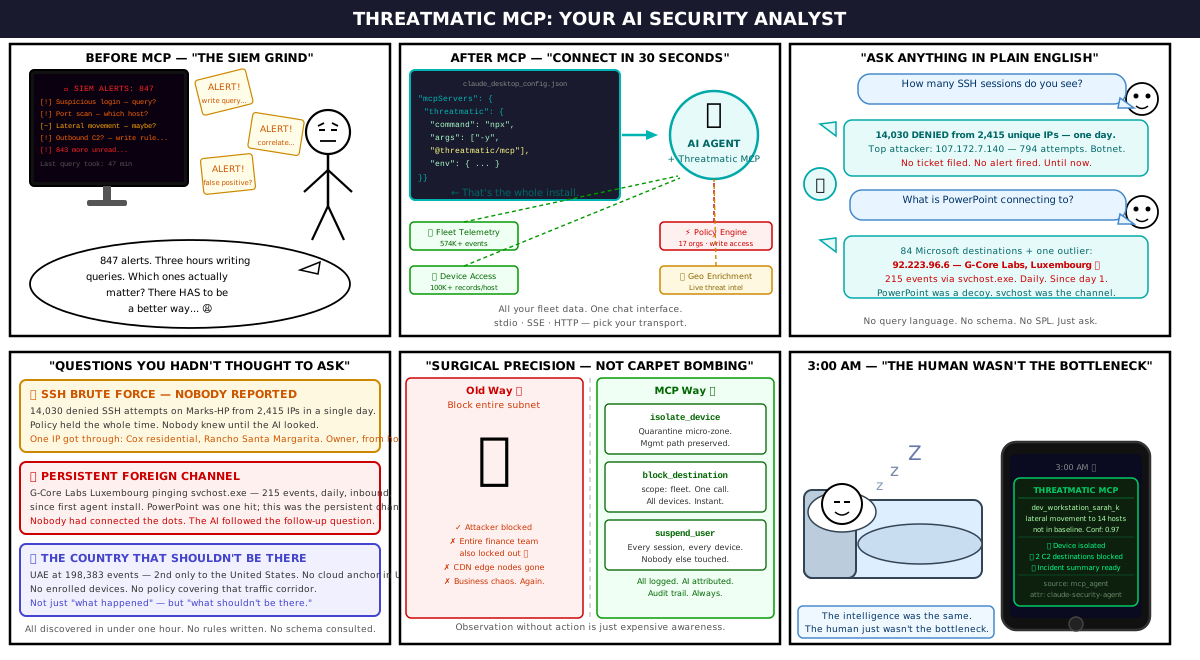
What Actually Happened When We Turned It On
We ran a live session recently — no scripts, no rehearsed queries. Just an AI assistant connected to a real Threatmatic deployment with real data. Here's what it found in under an hour.
The SSH Brute Force Nobody Reported
We asked a simple question: "How many SSH sessions do you see?"
The assistant queried the fleet's flow log telemetry and came back with this:
14,030 denied SSH attempts on Marks-HP from 2,415 unique IPs — all on a single day.
Top attacker: 107.172.7.140 — 794 connection attempts in one session. Behind it, a distributed sweep from IPs across dozens of countries. Classic botnet brute-force behaviour.
Only one IP ever got through: 68.4.215.108 — a Cox Communications residential address in Rancho Santa Margarita, California. Six successful connections over three weeks. Almost certainly the device's owner connecting from home.
No ticket had been filed. No alert had fired. The policy had held — but nobody knew about the volume of pressure the device was absorbing until the AI looked.
The Persistent Foreign Connection
When we asked "What is PowerPoint connecting to?" we expected the usual Microsoft telemetry. What we got was 84 destinations, all Microsoft — except one:
92.223.96.6 — G-Core Labs, Luxembourg.
One hit from PowerPoint. Noted but not alarming. Then we asked the follow-up question an analyst might forget:
"What is G-Core connecting to on that machine?"
215 events. Daily. Since the first time the agent came online. The remote host was pinging the machine, initiating inbound connections to svchost.exe, and showing up every morning at the same time window. PowerPoint was a one-off — svchost.exe was the persistent channel, and nobody had connected the dots until the AI ran the full picture.
The Country That Shouldn't Be There
Across all flow log and device access telemetry, the AI aggregated events by country of origin and generated a live geo-map. The top countries were expected: US, UK, Germany, Ireland — Microsoft infrastructure, CDN nodes, cloud edge.
Then: UAE at 198,383 events. Second only to the United States.
No known cloud anchor in the UAE. No enrolled devices in that region. No policy covering that traffic corridor. The AI flagged it immediately.
That's the intelligence value: not just answering what happened, but surfacing what shouldn't be there.
The Two Things MCP Does That Nothing Else Does
It Mines Intelligence From the Full Depth of Your Data
Traditional SIEM tools are built around known query patterns. You write a rule, you get an alert. If you didn't think to write the rule, you don't get the alert.
Threatmatic MCP inverts this. An AI assistant connected to the platform can explore your telemetry the way a senior analyst would — following hunches, correlating signals across data sources, asking follow-up questions mid-investigation. It can go from "show me ingress denies" to "which of those IPs are probing the same port on multiple hosts" to "what's the geo distribution of that traffic" in a single conversation thread.
In our session, we queried:
- Flow log events (574,000+ records for one queue alone)
- Device access events (100,000+ records from a single host)
- Policy assignments across 17 organisations
- Queen message queue telemetry across 6 queues and 55 partitions
- Real-time geo enrichment against live threat intelligence
All from a chat interface. All in plain English.
It Can Change Posture With Surgical Precision
Observation without action is just expensive awareness.
Threatmatic MCP closes the loop. The same assistant that identifies a threat can immediately enforce a response — not by triggering a broad network block, but by targeting the exact identity responsible.
A device exhibiting lateral movement? isolate_device drops it into a quarantine micro-zone in seconds, preserving the management path while cutting all other traffic.
A C2 destination seen across multiple hosts? block_destination with scope: fleet propagates the block to every enrolled device simultaneously.
A user credential showing anomalous behaviour at 3am from an unexpected country? suspend_user revokes their access across every session, every device, without touching anyone else.
This is the surgical precision that traditional tools can't offer. Blocking a subnet catches the attacker and the legitimate users beside them. Blocking by identity — user, device, application, workload — means the response is as precise as the detection.
The Architecture Behind It
Threatmatic MCP implements the Model Context Protocol — an open standard for connecting AI assistants to structured tools and data streams. It supports three transport modes:
| Mode | Use case |
|---|---|
stdio | Local agents, IDE extensions, CLI workflows |
SSE | Long-running agents that need a persistent event stream |
HTTP | Stateless queries from serverless functions or webhooks |
The server exposes three capability groups:
Live Network Events — every connection attempt, policy decision, anomaly, and device state change, streamed in real time as it happens across the fleet.
Security Posture — per-device, per-user, and per-workload risk scores, behavioral baselines, compliance state, and open anomalies. Derived continuously from telemetry — not from periodic scans.
Policy Actions — the write side of the platform. Isolate, block, suspend, create, update, close — every enforcement action available through the operations console, now accessible to an AI agent with full audit attribution.
Every action taken through MCP is recorded in the Threatmatic audit log with the API key, timestamp, and full parameters. Policy actions taken by an AI agent are attributed as source: mcp_agent alongside the agent name. The AI is accountable. Its actions are traceable. And it can never bypass the audit trail.
What This Means for Security Teams
The constraint has never been data. Modern security platforms generate more telemetry than any team can read. The constraint has always been human bandwidth — the time it takes to pull a query, correlate across data sources, form a hypothesis, test it, and act on it.
Threatmatic MCP removes that constraint.
An analyst who previously spent 45 minutes building a correlation query now asks the question in plain English and gets the answer in seconds. An on-call engineer who would have woken up to a vague alert now wakes up to: "Device dev_workstation_sarah_k is exhibiting lateral movement to 14 hosts not in its baseline. Confidence 0.97. I've isolated it and blocked the two C2 destinations seen in the event. Here's the incident summary."
The intelligence is the same. The posture change is the same. The human just didn't have to be the bottleneck.
Getting Started
The Threatmatic MCP server is available to all enterprise customers. Add it to your AI assistant or custom agent configuration:
{
  "mcpServers": {
    "threatmatic": {
      "command": "npx",
      "args": ["-y", "@threatmatic/mcp-server"],
      "env": {
        "THREATMATIC_API_KEY": "<your-api-key>",
        "THREATMATIC_TENANT": "<your-tenant-id>"
      }
    }
  }
}
API keys are scoped — you control exactly which actions each agent is permitted to take. Read-only for investigation workflows. Full enforcement for autonomous response. The minimum scope needed, nothing more.