28 servers. One policy. Zero connections. And a five-minute conversation that uncovered it all.
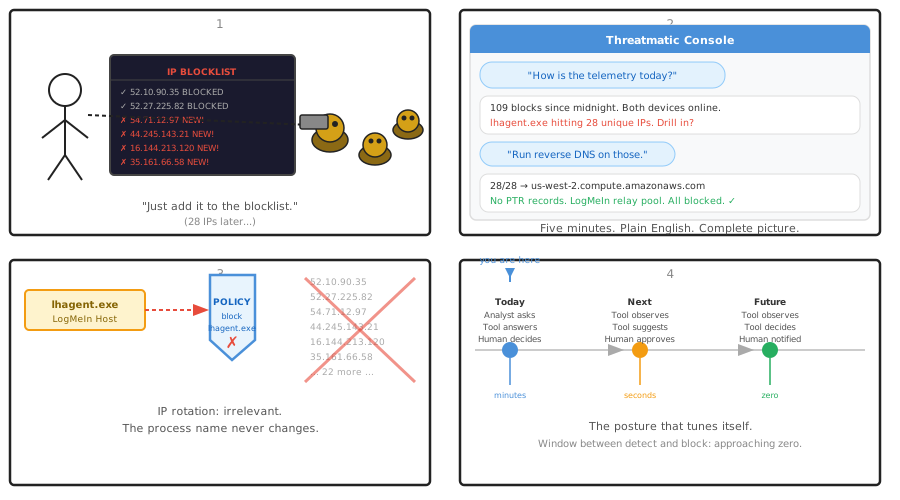
It started with a routine question.
A security analyst, reviewing the morning's telemetry for a managed endpoint, asked Threatmatic a simple question: "How is the telemetry today?"
What followed was a five-minute conversation that surfaced a sophisticated evasion attempt, confirmed it was fully contained, and produced a complete threat picture — without a single query written, without a dashboard opened, without a ticket filed.
This is that story.
The Setup
The endpoint in question — a Windows laptop belonging to a user named David — had two active blocking policies:
- Block LogMeIn — targeting
lhagent.exe, LogMeIn's host agent process - Block rmm.agent.exe — targeting a third-party Remote Monitoring and Management agent of unknown provenance
Both policies were added the previous day, after analysis revealed that David's machine had multiple unauthorized remote access pathways. The policies were simple: if the named process attempts an outbound connection, block it.
The question was whether they were working.
The Conversation
The analyst opened Threatmatic and asked, in plain language: "How is the telemetry today for Gilberts Cyber?"
Threatmatic pulled the latest device access events, summarized activity across both enrolled devices, and reported back:
"Both devices online. 109 blocks since midnight. Want me to drill into what specifically got blocked?"
Yes.
The breakdown arrived in seconds:
[4x] david-hp-zbook- | rmm.agent.exe -> 52.20.40.101
[4x] david-hp-zbook- | rmm.agent.exe -> 52.201.136.194
[3x] david-hp-zbook- | lhagent.exe -> 52.10.90.35
[3x] david-hp-zbook- | lhagent.exe -> 52.27.225.82
[2x] david-hp-zbook- | lhagent.exe -> 44.245.143.21
[2x] david-hp-zbook- | lhagent.exe -> 44.246.103.151
... (28 unique IPs total)
rmm.agent.exe was still trying its two known endpoints every few hours — blocked, consistently.
But lhagent.exe was doing something more interesting. It wasn't retrying the same IPs. It was working through a list — a different IP on each attempt, spread across the day, from midnight to late afternoon. Twenty-eight unique destinations. All blocked.
The analyst's next question: "Can you do a reverse DNS sweep on the lhagent.exe IPs to confirm the LogMeIn infrastructure?"
Threatmatic ran the lookups. Twenty-eight IPs. Twenty-eight results. Every single one:
52.10.90.35  -> ec2-52-10-90-35.us-west-2.compute.amazonaws.com
52.27.225.82 -> ec2-52-27-225-82.us-west-2.compute.amazonaws.com
54.71.12.97  -> ec2-54-71-12-97.us-west-2.compute.amazonaws.com
...
34.217.158.200 -> ec2-34-217-158-200.us-west-2.compute.amazonaws.com
35.162.225.132 -> ec2-35-162-225-132.us-west-2.compute.amazonaws.com
100% AWS US-West-2. No custom PTR records. No logmein.com hostnames. Deliberate fingerprint avoidance. A rotating relay pool designed to defeat IP-based blocklists.
The analyst's conclusion: "Brilliant."
Five minutes. Complete threat picture. Zero dashboards.
Why IP Blocking Fails
LogMeIn's evasion behavior — cycling through 28 distinct AWS IPs in a single day — isn't unusual. It's the standard operational posture for modern RMM platforms.
The reason is simple: IP-based blocking is a losing game, and RMM vendors know it.
Maintaining a blocklist of LogMeIn's infrastructure IPs requires knowing every IP they use — today, tomorrow, and after the next time they expand their relay fleet. LogMeIn operates across thousands of AWS instances. The IPs rotate. New ones appear. Old ones disappear. Keeping up is a full-time job that ends in failure anyway when the vendor adds a new /16.
Security teams that rely on IP blocklists to control RMM tools are playing whack-a-mole against an opponent with an unlimited supply of moles.
The process name doesn't change.
lhagent.exe is lhagent.exe regardless of which AWS IP it connects to. It was lhagent.exe when it tried 52.10.90.35. It was lhagent.exe when it tried 35.162.225.132. It will be lhagent.exe when LogMeIn provisions another hundred relay servers next quarter.
A single application-layer policy — block outbound connections from lhagent.exe — catches every attempt, forever, regardless of destination. The vendor's infrastructure decisions become irrelevant.
This is the difference between network-layer and application-layer enforcement. At layer 3, you're chasing IPs. At layer 7, you're enforcing intent.
The Analyst-Tool Dialog: A New Security Primitive
The technical outcome — 28 blocked connections, policy holding, threat contained — is important. But the more significant development is how it was discovered.
Traditional security investigation looks like this:
- Open SIEM dashboard
- Write a query (or find the right pre-built one)
- Wait for results
- Interpret the output
- Pivot to a second query for more context
- Repeat until the picture emerges
This process works. It also takes time, requires query fluency, and produces results that are only as good as the questions the analyst knew to ask.
The Threatmatic investigation looked like this:
"How is the telemetry today?" → Summary: 109 blocks, both devices online
"What specifically got blocked?" → Breakdown: 28 IPs, lhagent.exe, rmm.agent.exe
"Run reverse DNS on the lhagent.exe IPs." → Result: 28/28 AWS us-west-2, no PTR records, confirmed LogMeIn
The analyst didn't write a query. They asked questions. The tool answered. The picture emerged from the conversation itself — each answer informed the next question, the way a good investigation actually works.
This is conversational telemetry analysis — and it changes the skill requirement for security investigations. You don't need to know the query syntax. You need to know what questions to ask.
That's a much lower barrier to entry. And it means analysts spend their time on insight, not on tooling.
What Comes Next: Autonomous Posture Tuning
The natural evolution of this pattern is closing the loop entirely — moving from analyst asks, tool answers to tool observes, tool acts.
The telemetry is already there. The patterns are already detectable. The policy engine is already capable of enforcement. The missing piece is the decision layer that connects observation to action automatically.
Here's what that looks like in practice:
Behavioral baselining Threatmatic observes normal application behavior across the fleet over time — which processes connect to which destinations, at what frequency, with what response patterns. This baseline is per-device, per-application, and continuously updated.
Anomaly surfacing When a process deviates from its baseline — new destinations, new timing patterns, new connection volumes — Threatmatic flags it automatically. Not a SIEM alert. A specific, contextualized signal: "lhagent.exe contacted 12 new IPs today that it has never contacted before."
Policy suggestion Based on the anomaly and the existing policy library, Threatmatic proposes a remediation: "Block outbound connections from lhagent.exe. This process has no approved business function in this organization's policy set. Confidence: high."
One-click enforcement The analyst reviews the suggestion and approves it. The policy deploys fleet-wide in seconds. No query writing. No ticket filing. No change management lag.
Fully autonomous mode For organizations that want it — and for threat categories where the confidence threshold is high enough — Threatmatic can enforce without approval. A new process exhibiting beaconing behavior gets blocked automatically. The analyst is notified after the fact, with a complete audit trail.
The progression is deliberate:
Today:     Analyst asks → Tool answers → Analyst decides → Policy created
Next:      Tool observes → Tool suggests → Analyst approves → Policy created
Future:    Tool observes → Tool decides → Policy created → Analyst notified
Each step reduces the time between threat detection and containment. The final step — fully autonomous enforcement — compresses that window to zero.
The Posture That Tunes Itself
The endgame is an endpoint posture that responds to what it observes, not to what an analyst had time to investigate.
LogMeIn rotates through 28 IPs in a day. A fully autonomous Threatmatic deployment detects the first anomalous connection, identifies the process, cross-references it against the policy library, and blocks lhagent.exe — before the second connection attempt.
The vendor's evasion infrastructure never gets a second chance. The process name is caught on the first try.
You can rotate IPs forever. You cannot change your process name.
Threatmatic's conversational telemetry analysis and autonomous posture tuning are available to enterprise customers. Contact us to discuss deployment options for your fleet.