"Verified" and "worked" turned out to be two different claims.
netqos is the quiet half of Threatmatic's Windows enforcement — no kernel driver, no custom protocol, just Windows' own built-in bandwidth shaper, configured the way Group Policy configures it, minus the domain. Point it at a flow, give it a rate, and Windows' Quality of Service Packet Scheduler is supposed to do the rest.
For weeks, every policy it wrote reported success. The registry key existed. The values looked right. Nothing was throttled. Not once.
This is the story of how we found out, and what it took to actually fix it.
The Confidence That Should Have Been a Warning Sign
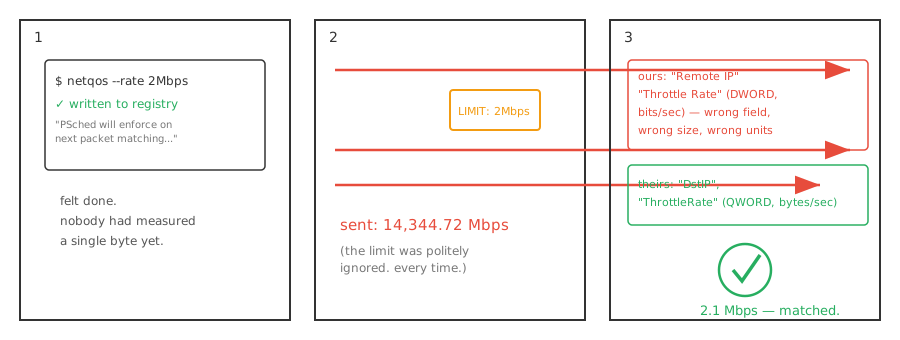
$ netqos --rate 2Mbps
✓ policy written to registry
  PSched will enforce on next packet matching this flow.
That message is accurate, as far as it goes. The registry key really was written. The values really were readable. Nothing lied to us on purpose — the tool did exactly what it said, and what it said just wasn't the whole story.
"Verified" had only ever meant: the CLI computed the right number, and the registry write didn't error. Nobody had actually put real traffic behind it and measured what came out the other side.
The Test Nobody Had Run
We finally ran it. A real flow, a 2Mbps policy, a receiver on the other end counting bytes.
14,344.72 Mbps. Not a typo. Full, unthrottled speed, as if the policy didn't exist.
The first instinct was to blame the topology — a Hyper-V VM talking to its own host over a virtual switch, or two processes on the same machine talking over loopback, both of which have legitimate reasons to skip the normal network path entirely. Both were retested against a second, real, physically separate machine. Same result. Zero throttling, every time.
Chasing the Wrong Leads, on Purpose
Before touching the actual bug, every simpler explanation got ruled out, one at a time:
- Registry values wrong? No — every field matched Microsoft's own documented schema.
- QoS Packet Scheduler not bound to the adapter? No — confirmed enabled.
- Missing a required source-IP filter? No — tried an explicit, fully-specified policy. No change.
- Needed a Group Policy refresh to take effect? No —
gpupdate /force, no change.
Every dead end was still useful. Each one removed a plausible, easy explanation, which is most of what makes the next step feel less like guessing and more like narrowing a search.
"I Have My Doubts About PSched"
That was the actual turning point — not a new theory, but permission to stop trusting the premise. If the registry values were correct and the mechanism still didn't fire, maybe the mechanism itself was the thing to test, not assume.
So we tested it directly. Not netqos. Microsoft's own New-NetQosPolicy cmdlet, the officially supported way to write the exact same kind of policy — same destination, same rate, same everything netqos was already doing.
2.1 Mbps. Throttled correctly, on the first try.
PSched worked fine. netqos didn't.
Two Bugs, Hiding Behind Each Other
With a known-good reference policy sitting in the registry next to netqos's own, the difference was just a diff away.
netqos (wrong) | New-NetQosPolicy (correct) | |
|---|---|---|
| Destination field | Remote IP | DstIP |
| Rate field name | Throttle Rate | ThrottleRate |
| Rate units | bits/sec | bytes/sec |
| Required fields | — | NetProfile, Precedence |
The field names traced straight back to an archived Microsoft documentation page — a schema from Windows Server 2012 R2 that current Windows simply doesn't read anymore. An easy mistake to make and an easy one to miss, because nothing about writing to the wrong field name produces an error. It just writes, successfully, into a key nobody's listening to.
Fixing the names surfaced a second bug hiding behind the first. Even with the right fields, Windows silently rejected the policy — ERROR_INVALID_PARAMETER, visible only in a Group Policy event log nobody had reason to check yet. The rate value needed to be a 64-bit integer. netqos was writing a 32-bit one. Same number, wrong size, rejected without a word to the caller.
Two bugs. Neither one threw an error. Both silent, both total, both fixed in about an hour once the right reference existed to compare against.
What Actually Confirmed It
Not a clean test run in a lab. A real second machine, on real Wi-Fi, receiving real bytes.
2.1 Mbps against a 2Mbps cap. Matching, byte for byte, what Microsoft's own tooling produced against the identical policy.
That's the bar this needed to clear — not "the code compiles," not "the registry key exists," but a receiver on a machine we don't control, counting bytes we can't fake.
The Lesson, Generalized
Every claim of "verified" is really a claim about what was checked, and it's worth being precise about which one you mean. "The write succeeded" and "the feature works" sound like the same sentence. They are not, and the gap between them can sit unnoticed for as long as nobody builds the test that would tell the difference.
The fix here wasn't clever. It was a diff against a reference implementation, and the willingness to stop trusting a design that had already passed every check we'd thought to run.
We already know this shape of problem from the other direction — frequency analysis on fleet telemetry has caught periodic signals hiding in plain sight before. The same instinct — don't trust the summary, go look at the actual signal — is what found this one too. It just took a byte counter instead of a Fourier transform.
Curious what else "verified" actually means across your stack? Talk to our team.